Posts

Showing posts with the label kvm consoles

Are KVM Consoles the Right Choice for Your Business?

Image
  In an era defined by continuous uptime, dependence on strategic IT environments, and rising infrastructure complexity, the tools required to manage systems are much more than mere operational decisions. Among these strategic decisions and tools, KVM (Keyboard, Video, Mouse) consoles continue to play a critical role in data center and server room management. But the question that is important is whether they are the right fit for your business. What is a KVM console? A KVM console is a hardware interface that allows IT administrators to control multiple computers or servers from a single workstation. By consolidating keyboard, monitor, and mouse access, KVM systems can eliminate the need for dedicated peripherals for each machine. Modern KVM solutions extend beyond basic switching which means they include the following: · Rack-mounted LCD consoles · Remote (IP-based) access capabilities · Multi-user support · Integration with enterprise IT infrastructure Key benefits of KVM conso...

Customized Racks: Tailored Solutions for Modern IT and Industrial Infrastructure

Image
  In today's fast-evolving technological landscape, businesses require infrastructure solutions that align perfectly with their operational needs. Standard rack systems may not always provide the flexibility, scalability, or functionality required for specialized environments. This is where Customized Racks play a vital role. Designed to meet specific requirements, customized rack solutions help organizations optimize space, improve equipment management, and enhance overall operational efficiency. Whether it is a data center, laboratory, industrial facility, or enterprise network environment, customized racks offer the adaptability needed to support diverse equipment and applications. What Are Customized Racks? Customized Racks are specially designed enclosures or mounting structures built according to unique customer specifications. Unlike standard racks, these solutions can be modified in terms of dimensions, load-bearing capacity, ventilation, cable management, security featur...

Intelligent KVM Switch: The Complete Overview

Image
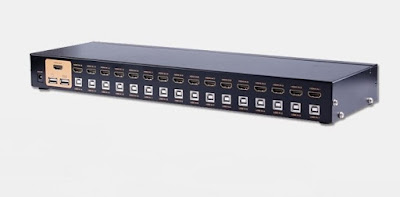
  Intelligent KVM Working with multiple computers in your office, home, or a data center means you need to use more than one keyboard, monitor, and mouse. As the business grows, the number of Servers also increases. It becomes impossible to manage such a situation as it consumes space and involves moving around to use them. The best way to solve this problem is by using an intelligent KVM switch. What is a KVM Switch? A KVM switch is a piece of hardware that allows you to control many computers using a single monitor, mouse, and keyboard console. This single console can help you connect to many servers, workstations, tablets, computers, and PCs simultaneously remotely. It suits people or even data centers that need access to several computing devices at a go. It can connect to these systems over short or long distances. So intelligent KVM switches are the backbone of the IT infrastructure where an IT administrator can work on hundreds of servers using a single console. Advantages o...

Explain the categories of KVM switches?

  For an efficient data centre and problem-free IT service, it is vital to have KVM switches install that will help you to maintain balanced and easy networking. As a result, your frequency of downtime will lessen and help you improve your productivity. A KVM switch is a hardware device used to connect multiple computers with the help of a single keyboard, mouse and monitor. The KVM consoles have made it relatively easy for data centres and other industries to handle operations efficiently. Based upon their accessibility, the KVM switches are divided into two categories which are: Single-user KVM Switch: these KVM switches are ideal for small scale industries or businesses. A single person can access numerous systems from anywhere. Multiple-user KVM switch: these KVM switches help multiple users to use numerous systems.    From the perspective of technology and features, the Port KVM switches are divided into two categories: Analogue KVM switch: these KVM switches are op...

Understanding the Difference Between a KVM Switch and Serial Console

  With the increasing IT industries and demands, it has become essential for a person to multi-task. Often people need to use multiple networks or multiple screens. KVM switch and serial console help control IT equipment and are an essential part of your server system. But the work they do make them different from each other. KVM switches and serial consoles might be small in size, but they play a vital role in connecting the server. The productivity also increases as a single person can operate multiple screens and networks without going from one place to another. KVM Switches can control PCs, whereas serial console can control network-connected devices. KVM switches can operate between the connected devices, but Serial consoles can access the system consoles of the network. KVM Switches  A port KVM switch helps control several monitors with the help of a single keyboard and mouse. The KVM switches are used where there is no need for the keyboards, and a person needs multip...

Port KVM Switches - What you need to know

KVM switches are an essential part of a networking system; It is a piece of hardware used to control multiple computers with single a keyboard, mouse and monitor.KVM switches are a boon to IT industries; anyone who requires two monitors to work can connect his system with a KVM switch; even for larger-scale connectivity KVM switches are appropriate. Netrack is an automatic transfer switch manufacturer , providing high quality KVM switches. KVM switches are available in four types: A single user KVM switch allows only one person to access all the system; it can be operated from only one point. Multi-user KVM switch: this switch enables multiple people to use a more significant number of systems. Analogue KVM switch: this system requires a direct connection between the operating system, mouse and KVM switch. Digital KVM switch: this system allows controlling computers over any IP address. It depends upon your company’s requirement which KVM consoles will benefit you the most. Make sur...

10 things to look for in a KVM switch

  What is KVM switch? A KVM switch is a device used to connect multiple computers with one keyboard, monitor, and mouse. They are space and cost-efficient and make the work easier by eliminating the tension to handle 3-4 computers at a time.   Points to remember No. of sources: It is essential to know the number of source computers to know the exact amount of the KVC switches you will need. Compatibility: A KVM switch will not work efficiently if it does not have compatibility with the system. A non-compatible switch will cause glitches over and over again. To avoid the situation, you can check the compatibility in the first audit. Port expansion: the most common mistake everyone makes is limiting the number of ports. There is always a need for extra KVM ports even though you have calculated the number of systems. It is advisable to buy 20%-25% extra for your system. To have it in spare and also to use it when one switch doesn’t work. Power supply: it is better to choose KVM...

Netrack cutting edge technology

A KVM console  is an interface device accessible from the Cisco UCS manager GUI or the  KVM  launch manager that mimics a direct  KVM  connection. The DKX3 high performance KVM-over-IPs is the top of the range KVM consoles we are showcasing today.   It is an enterprise class KVM-over IP switches which enables one to eight users with remote BIOS-level control of 8 to 64 servers. Let’s look at some of the features of the console; features a fully integrated LCD Console with a TFT widescreen in a rack mountable housing, short depth design allows you to install the device in a narrow space, superior video quality, ultra slim 99 keys keyboard with small numeric keyboard and two button touchpads, access and control up to 8 computes from a single USB KVM (keyboard, video and mouse) console, support computers with USB or PS keyboard and mouse, supports multiple systems: Windows, Linux, Mac and Sun, convenient computer switching via front panel pushbutto...

Port KVM Switches- A preface

Image
Abbreviated as the keyboard, video, and music, The Port KVM Switches has been instilled with a micro controller that combines music, video and keyboard signals and compresses into small packets which are transferred through an Ethernet link to a remote console. The port KVM switches are used as the standby in the power plane during the entire BIOS process. It is can handle multiple computers which are connected either locally or globally with the aid of IP connections. There are several manufacturers which provide port KVM switches , however, Netrack , a leading manufacturer of networking racks for servers and data centers, provide quality and a comprehensive port KVM switches .   Different port KVM switches provided by Netrack: There are different port KVM switches provided by Netrack , some of them are: 1>        Dominion KX II The Dominion KXII port KVM switches have the ability to handle 64 multipla...